DMS 1.5 "The Wolverine" Released

DMS 1.5
The Wolverine
DankMaterialShell (DMS) 1.5 "The Wolverine" is here! This release introduces Frame Mode, a new connected surface that ties the whole shell together, native DankCalendar integration, Hyprland Lua config and enhanced MangoWM support, a reworked Material 3-like shadow system, and hundreds of fixes and improvements across DMS.
Frame Mode + Connected or Standalone Surfaces
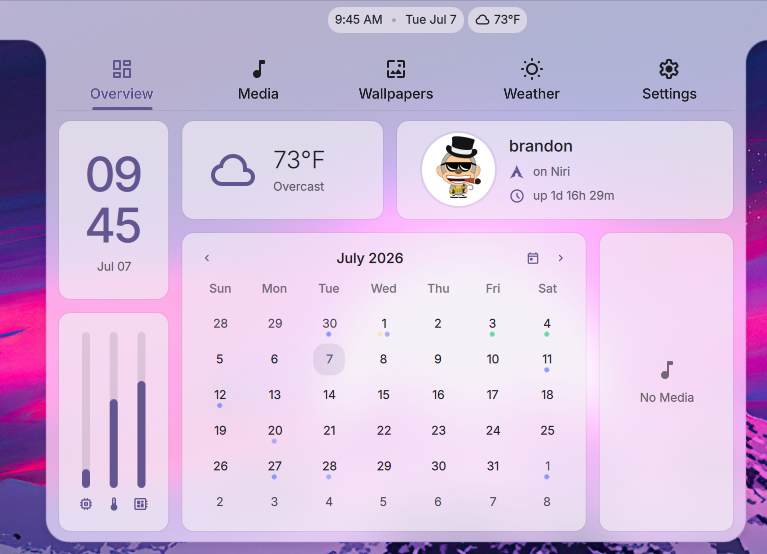
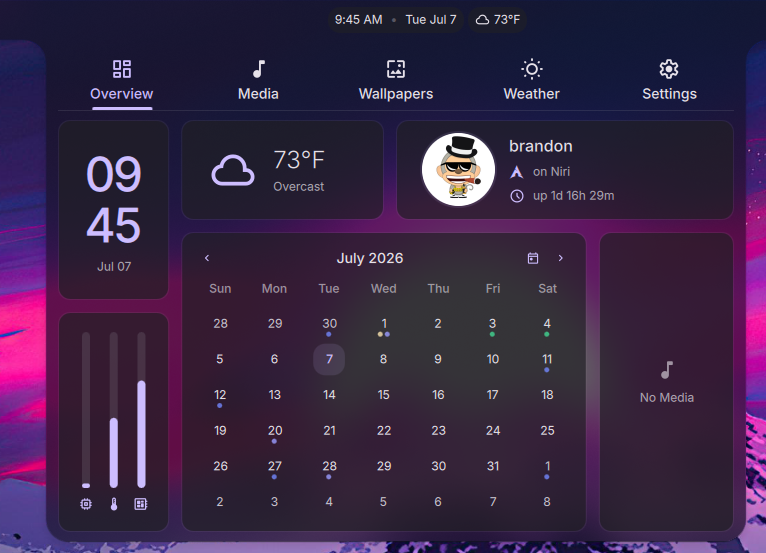
DMS 1.5 adds the option to draw the shell surfaces as one connected surface, tying modals (such as the launcher), popouts, and notifications into the bar and frame.
- New Animations: There are new animation options "Directional" and "Depth" in addition to the standard and default "Fade and Scale"
- Hover to Open: Optionally popouts can be opened on hover, without a mouse-click
DankCalendar
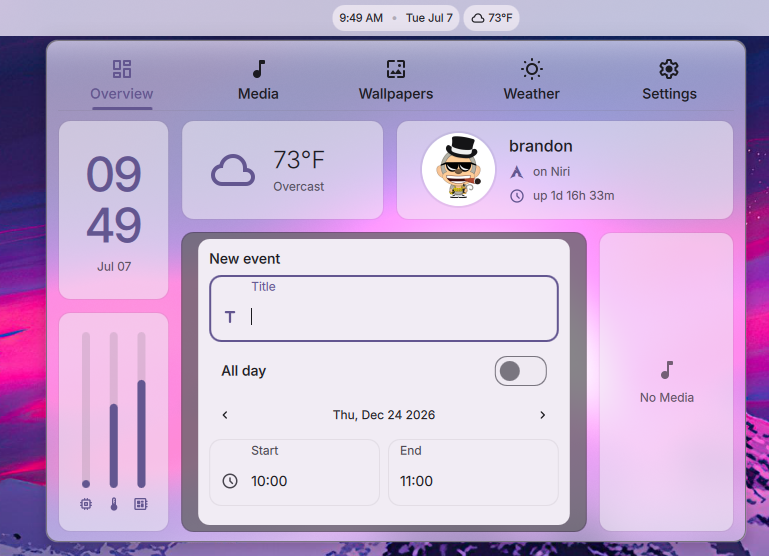
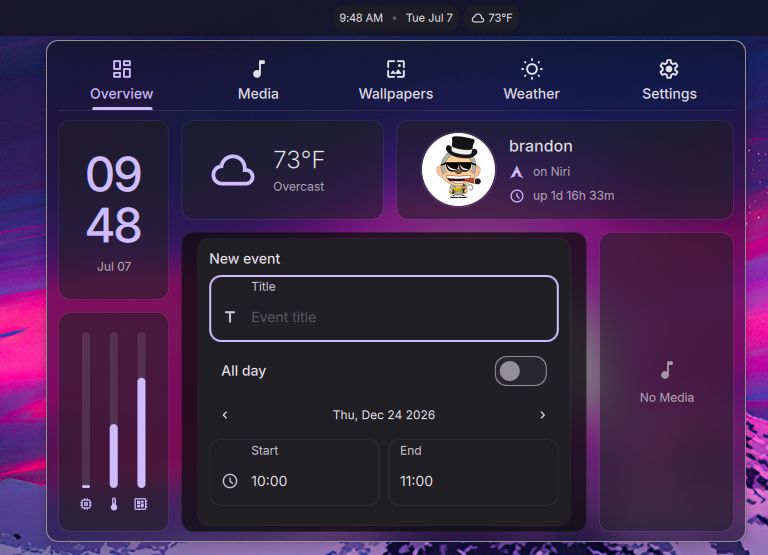
DMS 1.5 brings native support for DankCalendar (docs) as a calendar backend over IPC. This is a major new application addition that unifies Local, Google, Microsoft, CalDAV, and iCloud accounts into a single agenda.
When the dcal daemon is active, DMS detects it and establishes a bidirectional IPC connection. That connection enables several shell integrations:
- Full Event CRUD: You can now create, edit, and delete events directly within the shell calendar overview.
- Reminders Routing: Upcoming-event notifications are delivered natively through the DMS notification system.
- Offline Cache: Managed via a local SQLite cache database so agenda views work offline, syncing back as soon as connection is re-established.
- Secure Keyring Storage: OAuth tokens and secrets are stored directly in your system keyring (GNOME Keyring/KWallet) instead of plaintext files.
- Keyboard Navigation: Full arrow-key navigation for managing calendar events.
- Fully On Device: DankCalendar runs entirely on-device, connecting directly to your providers.
The DMS calendar provider is configurable for backwards compatibility with Khal, so users can continue to use the khal backend if desired.
Integrated Task Planner
In addition to task/reminder/VTODO integration from DankCalendar, a local to-do and task planner widget has been added to the calendar overview, contributed by goatnath (PR #2583). It manages your to-do lists and task states from within the shell calendar panel.
Greeter Enhancements
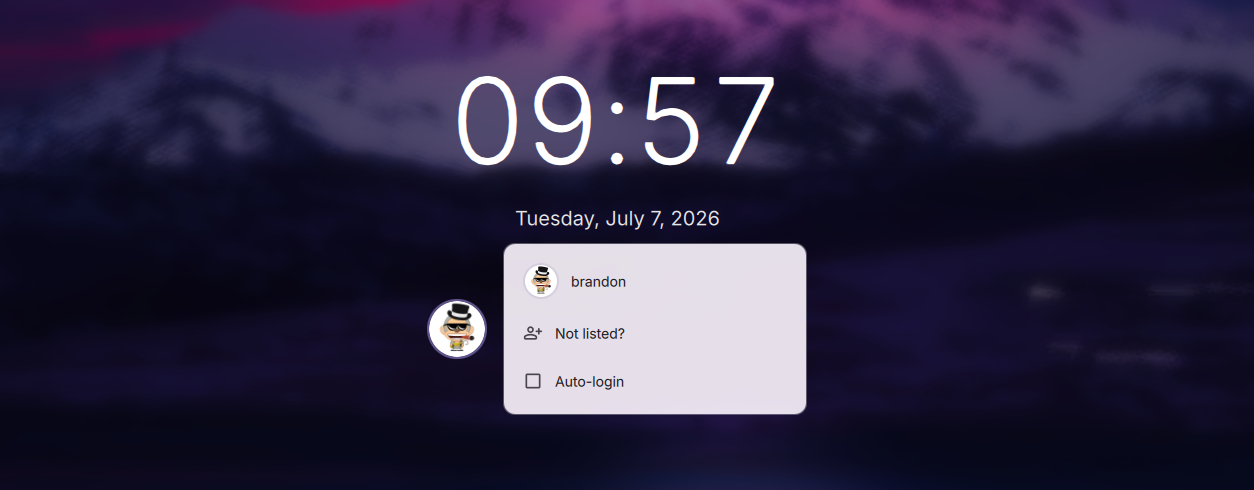
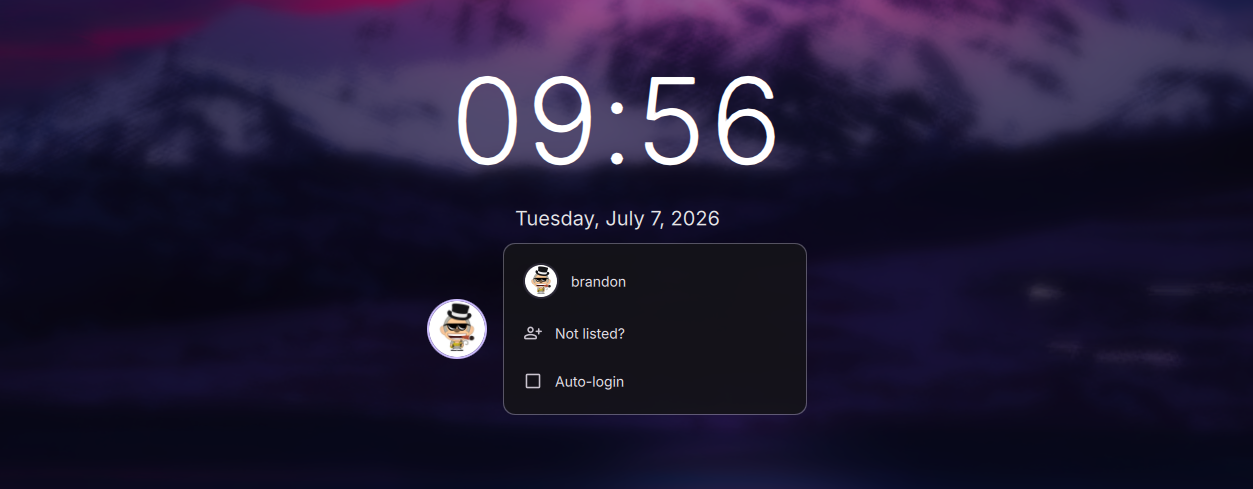
DMS 1.5 adds a settings GUI, multi-user account management, and per-user theme sync to the greeter.
- Settings GUI: Manage dms-greeter and greetd settings without editing config files by hand.
- Improved PAM Support: PAM authentication for fingerprint readers and U2F devices, with timeout recovery and unlock-state sync.
- User Accounts: A Users tab in DMS Settings creates accounts - username, initial password, and optional
wheel/sudoprivileges and greeter-group access - and lists every human user on the system with their UID, GECOS, and group membership. - Behavior Toggles: Remember the last user, remember the last session, and auto-login.
- Greeter Appearance: Per-greeter font family, 24-hour clock, seconds display, hour padding, and date format presets, separate from the lock screen settings.
- Custom Greeter Wallpaper: A login screen background independent of your desktop wallpaper, with the same fill-mode options.
- Sync Pending Indicator: A floating pill appears at the bottom of the tab when there are unsaved changes, so you can apply them without scrolling back to the top.
- Per-User Theme Sync: Each account gets an independent cache slot, so users can sync their own login-screen appearance - theme, wallpaper (light/dark/per-monitor variants), custom theme files, and profile picture - without system-wide sudo.
dms greeter syncpushes the primary user's full theme, wallpaper, and auth config.dms greeter sync --profilesyncs just one greeter-group user's slot, without touching the global config.- A Sync button in Settings handles both modes, falling back to a terminal when sudo isn't available.
Window Rules Manager
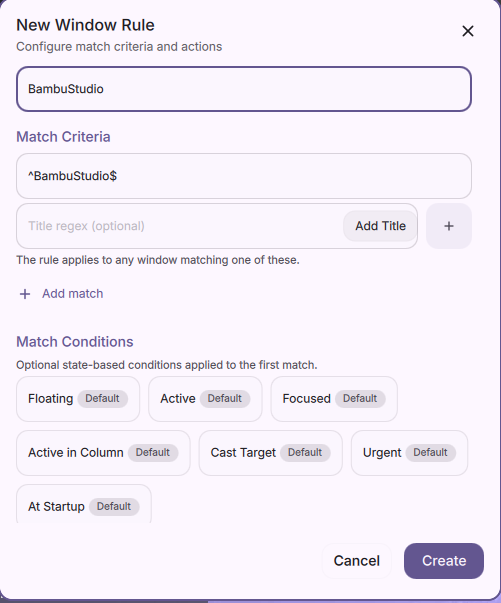
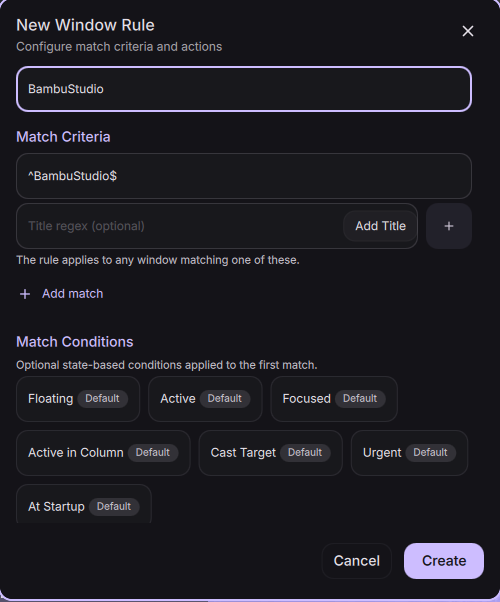
DMS 1.5 adds a Window Rules Manager for controlling window behaviors across Hyprland, Niri, and MangoWM.
A dedicated settings page allows viewing, editing, and creating window rules. A new IPC allows creating a window rule for the currently focused window.
Display Profiles
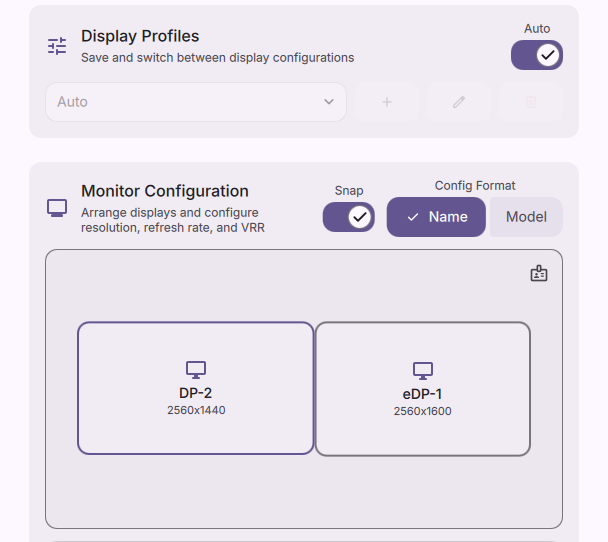
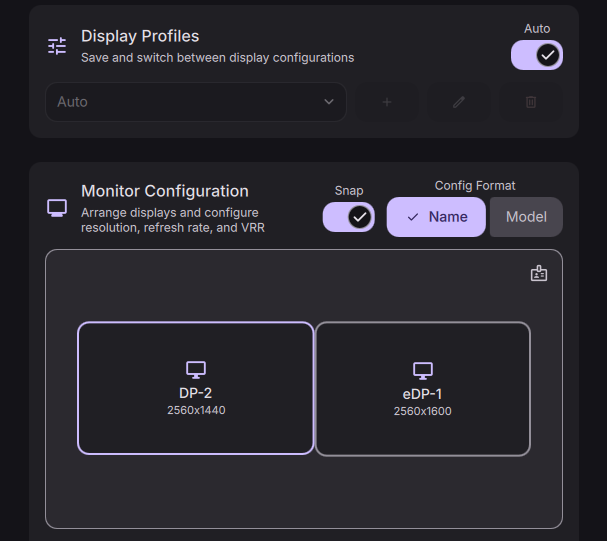
DMS 1.5 adds Display Profiles: saved monitor layouts that DMS can switch between automatically as outputs are connected or disconnected.
- Automatic Switching: DMS matches the connected set of outputs to a saved profile and applies it, so docking, undocking, or plugging in an external display restores the right layout.
- Control Center Widget: A Display Profiles widget switches layouts without opening Settings.
- Fractional Scaling Presets: Hyprland setups gain fractional scaling display presets.
- Disabled Outputs: Profiles can leave specific outputs turned off.
Hyprland Lua Configuration
DMS 1.5 moves all Hyprland default configurations to the new Lua format. When DMS deploys configs for Hyprland (via dms setup or dankinstall), it generates native Lua files instead of the older .conf format. This applies to all DMS-managed configurations such as key binds and monitor/output configurations. See the Hyprland configuration guide for details.
Enhanced MangoWM Support
DMS 1.5 adds better support for the MangoWM compositor across the shell, installer, and UI tools. dms setup now deploys MangoWM configurations and dankinstall supports MangoWM as a compositor option.
Material 3 Shadows & Elevation
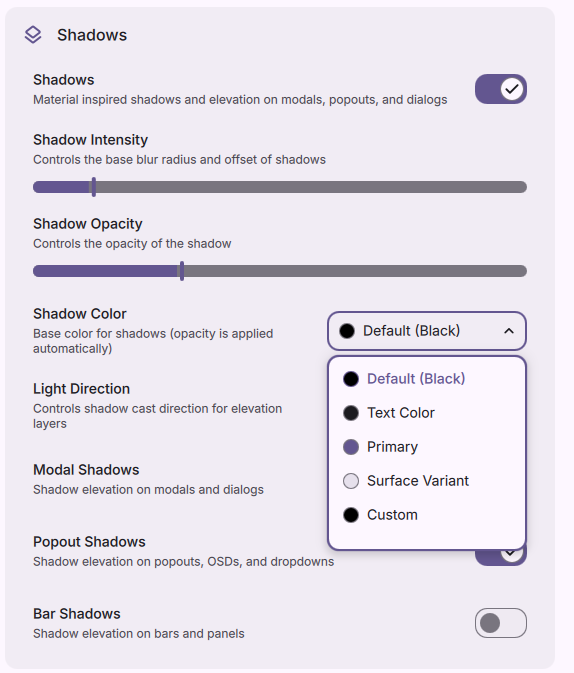
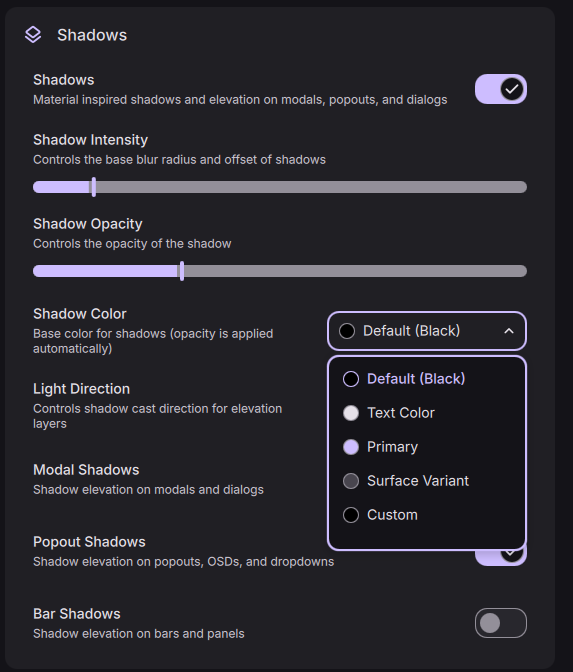
To support Frame Mode, the Material 3 elevation and shadow system was reworked so shadows stay consistent across connected, floating, and overlapping surfaces. A global shadow toggle lives in the Themes tab, with light/dark overrides and independent shadow controls per Dank Bar.
Spotlight - Lightweight Launcher
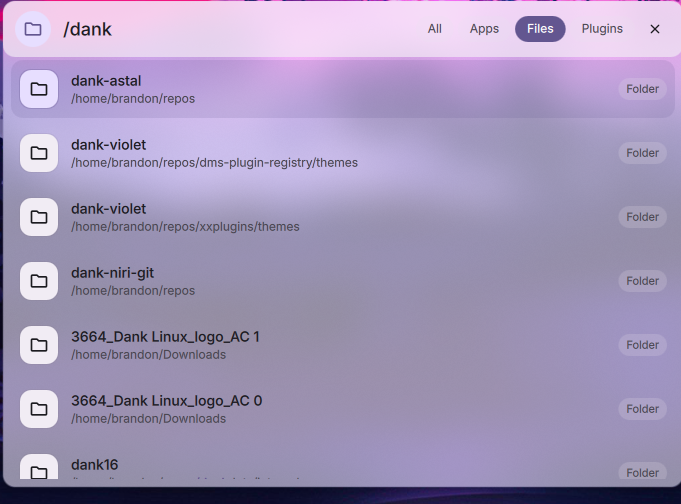
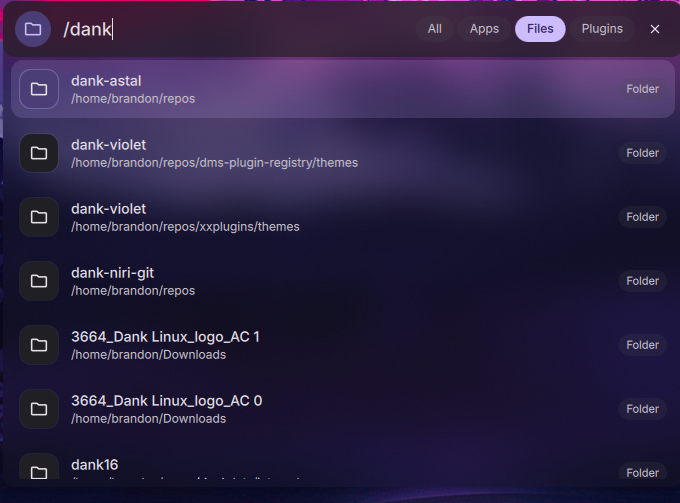
DMS 1.5 introduces Spotlight, a lightweight overlay launcher for minimalist setups. It sits in the center of your screen and searches files, folders, applications, and settings.
- Search Persistence: Spotlight persists your last search query and highlights it on open, contributed by Legend-017 (PR #2726).
- Prefix Queries: Use
/dand/fprefix tags to narrow the search to directories and files when dsearch is installed.
Notepad Rewritten with Standalone Window & Mime-Type Registration
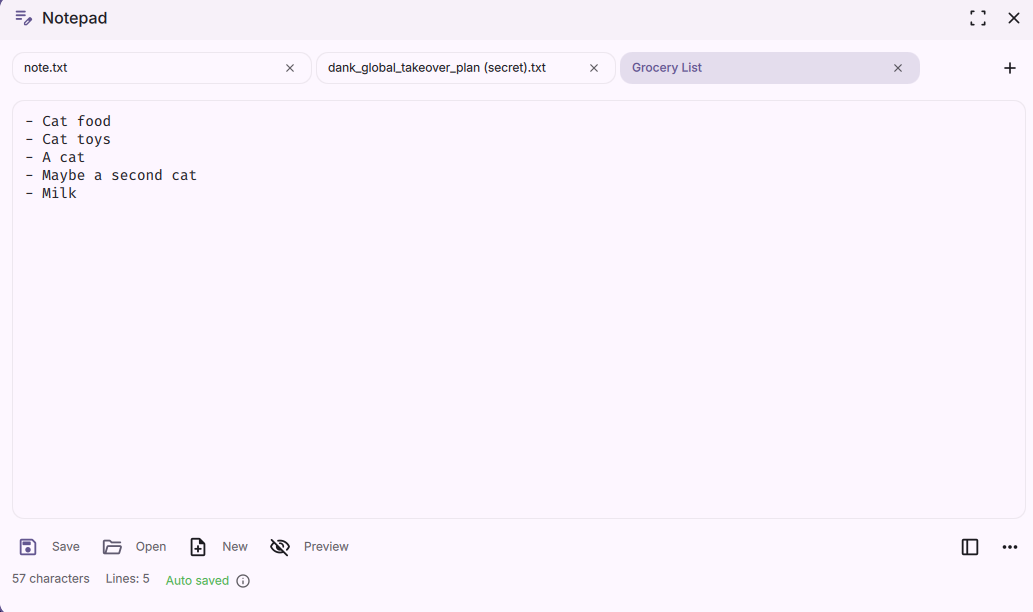
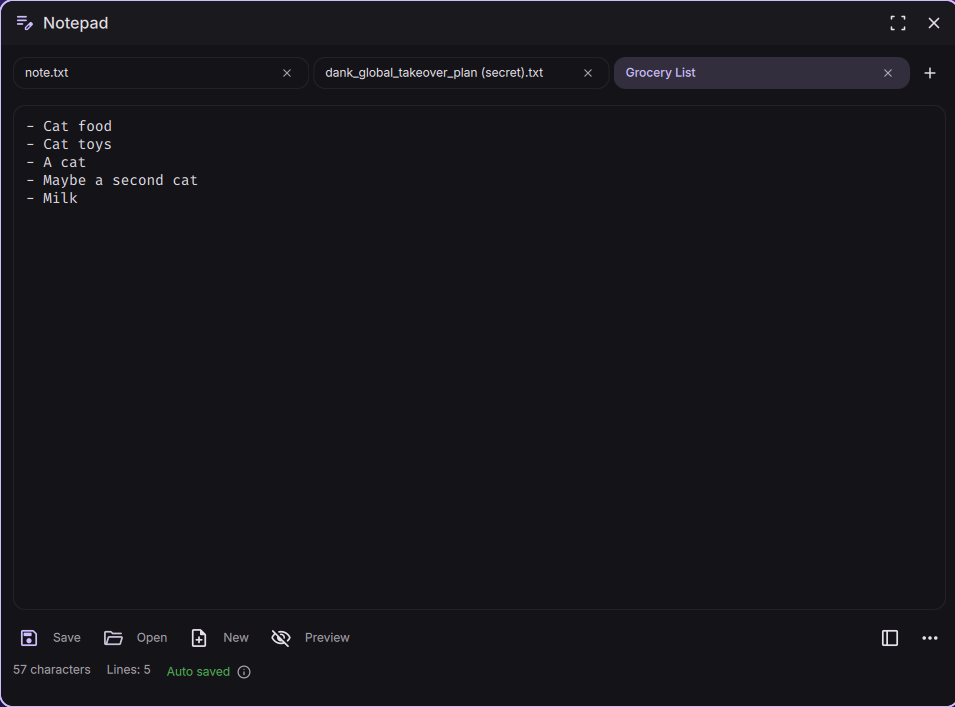
The Notepad utility has been rewritten with the ability to convert it into a standalone window and back to a surface. Additionally mime-type registration has been added so DMS Notepad can be (optionally) used as a default text editor for files.
Native Tailscale Integration
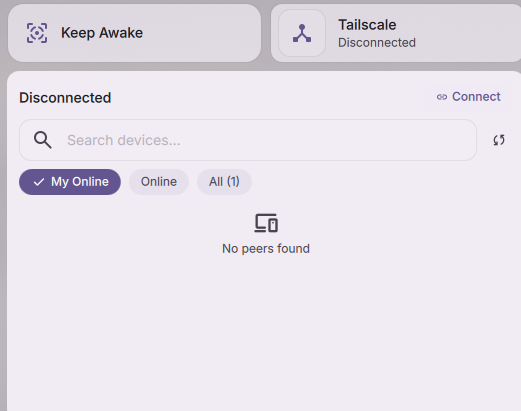
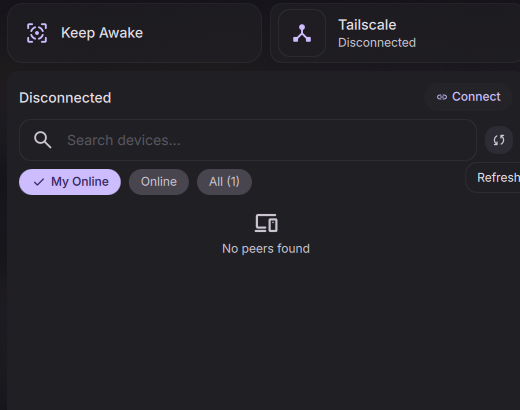
DMS 1.5 adds native Tailscale support inside the Control Center. Instead of custom scripts or command-line wrappers, DMS talks directly to the local Tailscale daemon for full VPN controls.
- Connection Toggle: Connect or disconnect your tailnet from the Control Center.
- Exit Node Selector: A dropdown lists the available exit nodes on your tailnet to route your traffic through.
- LAN Access Toggle: Allow or disallow local network access when connected to an exit node, so you can still reach local devices.
- Node Details: Shows your active Tailscale IP addresses (IPv4 and IPv6) and connection quality indicators.
System Management
DMS 1.5 pulls more of the system into the shell, so you can manage updates, power, autostart, and default apps without leaving your desktop.
- System Updater: Check for and apply system updates from the shell, with multiple package-manager backends and polkit authentication for privileged operations.
- Power Profiles: Switch between power-saver, balanced, and performance profiles from the Control Center or by scrolling the battery widget. A
cycleProfileIPC command is bound toMod+Pby default. - XDG Autostart: A new Autostart tab in Settings manages the applications that launch at login, following the XDG autostart specification.
- Default Apps: A Default Apps page in Settings sets your preferred applications for file types and URL schemes.
- User Session Switching: Switch between local user sessions directly from the shell.
Plugin Ranking, Moderation, and Community Feedback
With 230+ community plugins in the registry, DMS 1.5 introduces a ranking and feedback system so the best plugins rise to the top. Every plugin now has a tracking issue in the dms-plugin-registry that doubles as a forum and voting surface, and the plugins directory displays all of the new metadata affiliated with plugins.
- Upvotes: Anyone with a GitHub account can 👍 a plugin's issue to upvote it. The plugins page ranks by upvotes by default, so popular plugins surface first.
- Sorting & Filtering: Sort by upvotes, last updated, date added, name, or random, with an ascending/descending toggle, plus filters for reviewed-only and first-party-only plugins.
- Status Badges: Plugins can be flagged
reviewed,broken,unmaintained, ordeprecated, surfaced as badges both on the web page and in the in-shell plugin browser. - Moderator & Author Commands: Catalog moderators apply status flags via bot commands on the issue, and a plugin's own author can self-flag their plugin
/unmaintained(seeking a new maintainer) or/deprecated(superseded by another plugin or a built-in DMS feature).
Browse and vote on plugins at plugins.danklinux.com.
Huge thanks to hthienloc for working through the existing plugin registry to review and significantly improve the quality of the plugin ecosystem!
If you wish to contribute as a plugin moderator, refer to this ticket for details.
Other Notable Features
DMS 1.5 also brings a wide array of enhancements and options across other components of the shell:
Launcher & Clipboard
- Plugin Browser Screenshot Previews: The plugin browser now displays inline screenshot previews while browsing, alongside brand new sorting and filtering controls.
- Launcher QOL Improvements: Grid mode now supports
Ctrl+H/Lnavigation (contributed by kanghengliu, PR #2688), toggleable color-picker entries (lambdaclan, PR #2667), and the option to hide package source badges (hthienloc, PR #2676). - Clipboard Type Filtering: The clipboard history popout can now filter between Text, Image, and pinned entries, contributed by dionjoshualobo (PR #2640).
- Launcher History: The launcher keeps a history of recent entries (PR #2086).
- Terminal Multiplexer Launcher: A launcher mode for opening and attaching to terminal multiplexer sessions (PR #1687).
- Clipboard Editor & Search: Edit saved clipboard entries and search or filter clipboard history (PR #2492, PR #2464).
Network & Power
- Secret Service Integration: Auto-retrieves and unlocks WiFi/VPN credentials directly from D-Bus Secret Service backends.
- Saved Wi-Fi & Progress: WiFi connection progress indicators (contributed by NihilDigit, PR #2684) and a dedicated saved-networks editor tab (contributed by jbwfu, PR #2648) are now integrated, alongside a subtab network layout (PR #2633).
- Network Link Rate Reporting: DMS now reports the negotiated link speed when connected, providing accurate bandwidth context rather than theoretical maximums.
- Battery Settings Tab: A new battery management section in settings with toggles for remaining time, percentage display, and critical alerts was designed by hthienloc (PR #2634).
- Battery Refresh Rate: Automatically lower display refresh rates on battery power to conserve energy, contributed by atimofeev (PR #2428).
- Bluetooth Status: Added a visual bar indicator for connected Bluetooth devices, contributed by yechielw (PR #2662).
- Bluetooth Trust/Untrust: Control trusted status of Bluetooth devices directly from the Control Center.
Privacy & Security
- Screen Casting Detection on Niri: The privacy indicator now correctly detects active screen casting sessions on the Niri compositor via PipeWire (PR #2185).
- Night Mode & OSD Restoration: Night mode and OSD surfaces are now correctly restored after system resume from suspend (PR #2254).
Lock Screen
- Lock Screen IME Bypass: Implemented a direct keyboard layout and input method bypass for lock screen password fields, avoiding login failure due to layout mismatches (contributed by awerty-noob, PR #2609).
- Lockout Feedback: Rather than showing generic errors, the lock screen now queries and displays explicit faillock lockout reasons, contributed by Rocho-EL-Locho (PR #2669).
- Fingerprint/U2F Auth: Lock screen fingerprint and U2F authentication has been restored and hardened with timeout recovery and unlock-state sync (PR #2052).
- Video Wallpapers: Support for video files as a screen-saving background when the lock screen activates.
- Declarative NixOS Auto-Login: Added native support for configuring greeter auto-login declaratively within NixOS modules (PR #2734).
Odds & Ends
A handful of smaller fixes and quality-of-life touches, several from the community:
- DankDash Drag-n-Drop: Rearrange dashboard tabs and widget layout, with visibility toggles in Settings.
- System Tray Icon Tinting: Tint overrides keep tray icons consistent with your Material theme (PR #2266).
- Animated GIF Profile Pictures: The user avatar now supports animated GIFs (PR #1804).
- Tilde Expansion in Config Paths:
~now expands in all user-provided file paths (PR #2242). dms randrCommand: Query physical monitor scale factors without opening the display configurator.- Per-Screen Focus: The focused app widget tracks only the focused window on its own screen in multi-monitor setups (PR #2152).
- Do Not Disturb & Idle Inhibitor Indicators: New Control Center button indicators for do-not-disturb and idle-inhibitor state (PR #2513).
- Microphone Volume OSD: An interactive microphone volume OSD with IPC controls (PR #2406).
- Locale Hot-Reload: Change the shell locale and have it apply without a restart (PR #1817).
- Neovim Theme Engine: A rebuilt Neovim theme engine for Matugen color sync (PR #1985).
- GeoClue2 Location: Optional GeoClue2 location as an alternative to IP-based location (PR #1856).
Headless Installation
The dankinstall installer can now run fully unattended - no TUI, scriptable for provisioning, dotfile bootstraps, and CI. Passing --compositor and --term switches it into headless mode:
dankinstall --compositor niri --term ghostty --yes
Choose niri, hyprland, or mango for the compositor and ghostty, kitty, or alacritty for the terminal. Additional flags give you control over the rest of the install: --include-deps / --exclude-deps to tune optional dependencies (like dms-greeter), --replace-configs (or --replace-configs-all) to deploy named configs, and --yes to auto-confirm every prompt. Install logs are written to $DANKINSTALL_LOG (falling back to /var/tmp) and streamed to stdout.
Available Distributions







DMS 1.5 officially adds support for Void Linux and introduces official compatibility with Ubuntu 26.04 LTS.
See the installation guide for setup instructions.
Upgrade Notes
This release contains changes that may require manual intervention.
(Breaking) App ID Change
The DMS app ID is now com.danklinux.dms. If you have compositor window rules targeting the old app ID, you'll need to update them to the new ID.
Quickshell 0.3.0+ Required
DMS 1.5 requires Quickshell 0.3.0 or newer; support for 0.2 has been dropped. If you install via the Dank Linux repositories or dankinstall, this is handled for you - otherwise update Quickshell before upgrading DMS.
Bug Fixes and Improvements
View Details (700+ commits across v1.4.1–v1.5)
The following is a summary of notable fixes shipped across the v1.4.x hotfix series and incorporated into v1.5. All of these are part of the v1.5 release.
Frame Mode & Connected UI
- Fixed connected-mode surface recovery and fullscreen layering refinement.
- Fixed modal escape key handling in connected mode.
- Fixed bar offset calculation when using multi-monitor layouts.
Launcher & Spotlight
- Fixed file search premature exit when browsing deep subdirectories.
- Fixed keyboard navigation failing to show the last delegate item in grid view.
- Fixed settings focus loss when launching settings from the search bar.
- Fixed launcher text contrast on primaryContainer theme backgrounds (contributed by Silzinc PR #2586).
- Fixed frecency ranking in search results (#1799).
- Fixed launcher tab selection memory not persisting across opens (#1806).
Clipboard
- Fixed clipboard memory leak caused by unbounded Wayland offer maps and unguarded file reads.
- Improved clipboard thumbnail loading performance for large images (contributed by jbwfu PR #1759).
- Deduplicated pinned clipboard entries (contributed by jbwfu PR #2605).
- Fixed HTML elements getting parsed in clipboard text views (contributed by jbwfu PR #1798).
- Fixed powermenu close behavior during paste actions (contributed by jbwfu PR #2598).
- Fixed clipboard reliability in modal/popout contexts; forked child now registers Wayland source before returning.
- Fixed
file://prefix being missing for--filearguments indms notify(#1962).
Calendar & Tasks
- Fixed week-number option fallback when khal cache is empty.
- Fixed OSD calendar positioning on secondary monitors.
Hyprland & MangoWM
- Fixed Hyprland window focus during popout close sequences (contributed by awerty-noob PR #2655).
- Fixed display configurator operations in Hyprland profiles (contributed by Stodtyy PR #2506).
- Fixed mouse-wheel keysim scroll events mapping in Hyprland setups.
- Fixed missing import in Hyprland service.
- Fixed
no_initial_focusparameter name in Hyprland window rules (contributed by Qubes_Geek PR #1726). - Fixed recycled Wayland server object IDs for workspace/group handles (contributed by Qubes_Geek PR #1725).
- Fixed
resizeactivekeybind to include height dimension (PR #2126).
Themes, Matugen & Shadows
- Matugen pywalfox light/dark transitions (contributed by miguelsaliba PR #2537).
- Fixed separate light/dark icon paths hot-reloading latency.
- Fixed tray icon tinting and monochrome icon overrides.
- Fixed Matugen v4 version detection reliability.
- Fixed Matugen Zed Linux binary alias detection (PR #1982).
- Fixed Matugen
zedtemplate path quoting (PR #1972). - Fixed Matugen skipping theme refresh when colors haven't changed.
- Fixed light/dark mode portal sync.
- Fixed custom JSON theme settings rendering all theme options correctly.
- Fixed animation speed binding in notifications settings tab (#1974).
Notifications
- Configurable summary/body font sizes and opt-in progress bar (contributed by bogdan-velicu PR #2587).
- Maintained notification shadow during popup expansion.
- Fixed notification toast blur artifacts in connected layout modes.
- Added notification card inset for consistent visual alignment.
Dock & Bar
- Separate workspace appearance for unfocused displays (contributed by b0o PR #2687).
- Fixed dropdown animation duration latency (contributed by Rocho-EL-Locho PR #2661).
- Cleared bar blur region on autohide (contributed by Rocho-EL-Locho PR #2658).
- Excluded scroll events from propagating through workspace selector panels (#2108).
- Fixed dock context menu styling (#1742).
- Fixed dock transparency setting (#1739).
- Fixed dock visible when there's no active app (PR #1797).
- Fixed dock max height mask in vertical mode.
- Fixed app ordering in the dock on Niri.
- Fixed focused app widget fallback to app name in compact mode (#2005).
- Fixed named workspace icons not rendering.
- Fixed DankBar syncing settings to new bars on reload.
Wallpaper & Display
- Fixed multi-monitor wallpaper cycling not working (PR #2042).
- Fixed wallpaper redraw after lock screen dismissal (PR #2037).
- Fixed per-monitor wallpaper cycling when changing interval (PR #1981).
- Fixed wallpaper thumbnail cache preloading crash on large JPG collections.
- Fixed screenshot global coordinate space scaling across all screens.
- Fixed DPMS Off/On recovery storms (contributed by Rocho-EL-Locho PR #2654).
- Fixed display output config on delete and popup height.
Network & Connectivity
- Fixed enterprise-WiFi connection prompt password field boundaries.
- Cleaned up stale network links and VPN route tracking.
- Fixed DDC brightness not applying because process exits before debounce timer runs (PR #2217).
- Fixed negative WaitGroup counter on rapid DDC brightness changes.
Battery & Power
- Fixed Bluetooth battery detection latency for BLE peripherals.
Control Center
- Fixed invalid percentage number displays in Control Center (#2010).
- Fixed CC plugin reloading on bar position changes.
Greeter & Lock Screen
- Fixed wake monitors on input events when powered off by lock screen rules (contributed by nabaco PR #2572).
- Fixed awk parser script bugs in new greeter parsing scripts (contributed by ewtodd PR #2508).
- Removed max bpc options from greeter (contributed by LuckShiba PR #2528).
- Fixed greeter auto theme accent variants and color selection.
- Fixed greeter wireplumber state directory and U2F environment variables.
- Fixed greeter PAM allowing empty password submits to reach PAM.
- Fixed greeter duplicate crash handlers.
- Fixed greeter AppArmor install/uninstall behind
IsAppArmorEnabled()guard. - Fixed greeter on immutable distros by restoring
dms greeter sync.
Audio & Media
- Fixed output device switching controls on media popout scroll (contributed by hthienloc PR #2615).
- Excluded specific MPRIS players from displaying empty titles (contributed by cwelsys PR #2509).
- Fixed sound muting logic during active media playback (contributed by Rocho-EL-Locho PR #2652).
- Fixed audio output cycle and icon resolution for sink (#1808).
- Disabled audio effects during active MPRIS playback.
- Fixed OSD volume optional chain coercion (PR #2101).
Notepad & Settings
- Fixed settings search indexing crash for non-UTF8 locales.
- Fixed wallpaper redrawing on fill mode change (contributed by jbwfu PR #2542).
- Fixed settings search localization (contributed by jbwfu PR #2521).
- Fixed Notepad decode path URI when saving or creating a file (PR #1805).
- Fixed Notepad hide behavior and streamlined auto-save function.
Plugins & Localization
- Fixed plugin settings focus loss.
- Fixed RTL layout alignment for Hebrew and Arabic translation options.
- Added missing i18n strings (contributed by jbwfu PR #1746, PR #1729).
Doctor & Installer
- Fixed
dms doctorquickshell version regex (#2204). - Fixed
dms doctorimageformats detection (PR #1811). - Added
qt6-imageformatscheck to doctor output. - Fixed
dankinstallArch AUR package installation logic. - Fixed
dankinstallDebian ARM64 detection. - Enhanced DMS minimal install logic for all supported distros.
- Added Arch
dms-shellpackage migration support. - Fixed
dankinstallon Arch/extra package repository changes.
Popout & Surfaces
- Fixed popout transparency artifacts.
- Fixed popout focus of password prompts when popout is open.
- Fixed popout calls on stale references.
- Fully unload popout layers on close for memory efficiency.
- Decoupled shadow from content layer for cleaner rendering.
- Fixed popout anchor height-changing surfaces to top and bottom.
NixOS / Nix
- Updated Quickshell version in Nix flake (PR #2263).
- Added
packageoption fordms-shellin Nix (PR #1864). - Fixed NixOS greeter skip invalid
customThemeFilein preStart (PR #1997).
Event Handling & Core
- Added better handling in the Wayland event dispatcher (contributed by Qubes_Geek PR #1980).
- Fixed udev event loop termination; bumped Go to 1.26.
- Fixed window rule to use
fixedas default for width/height (#1774). - Fixed screensaver
ActiveChangedsignal on lock/unlock (PR #1761). - Fixed keybinds scroll position on list change (#1766).
- Fixed escape key handling in keybinds modal.
Community Contributors
DMS 1.5 - and the hotfix series leading up to it - would not be possible without the contributions of the wider community. A huge thank you to everyone who opened a PR, filed a detailed issue, tested a fix, or helped translate the shell.
If you were missed we're sorry! It's hard to keep track of everything sometimes, reach out on Discord or Github and we'll make sure to add you to the list.
Feature Contributors
| Contributor | Contribution |
|---|---|
| goatnath | PR #2583 - Integrated Task Planner widget in the calendar overview |
| Legend-017 | PR #2726 - Spotlight search persistence and highlight-on-open |
| kanghengliu | PR #2688 - Ctrl+H/L grid navigation in launcher |
| lambdaclan | PR #2667 - Toggleable color-picker entries in launcher |
| hthienloc | PR #2676, PR #2634 - Hide package source badges; Battery Settings tab |
| dionjoshualobo | PR #2640 - Clipboard type filtering (Text / Image / Pinned) |
| NihilDigit | PR #2684 - WiFi connection progress indicators |
| jbwfu | PR #2648 - Saved networks editor tab |
| atimofeev | PR #2428 - Battery refresh rate reduction on battery power |
| yechielw | PR #2662 - Bluetooth signal bar indicator |
| b0o | PR #2687 - Separate workspace appearance for unfocused displays |
| awerty-noob | PR #2609 - Lock screen IME bypass for keyboard layout mismatches |
Bug Fix Contributors
| Contributor | Contribution |
|---|---|
| jbwfu | PR #2605, #2598, #2542, #2550, #2521, #1798, #1759, #1746, #1729 - Clipboard, settings, wallpaper, i18n, and thumbnail fixes |
| Silzinc | PR #2586, #1823 - Launcher text contrast; icon resolution and switcher fallback styling |
| Rocho-EL-Locho | PR #2669, #2661, #2658, #2654, #2652 - Lockout feedback, bar/DPMS/media fixes |
| awerty-noob | PR #2655 - Hyprland window focus on popout close |
| Stodtyy | PR #2506 - Hyprland display configurator profiles |
| miguelsaliba | PR #2537 - Matugen pywalfox light/dark transitions |
| bogdan-velicu | PR #2587 - Notification font sizes and progress bar |
| nabaco | PR #2572 - Wake monitors on input when lock screen powers them off |
| ewtodd | PR #2508 - Greeter awk parser script fixes |
| LuckShiba | PR #2528 - Remove max bpc options from greeter |
| hthienloc | PR #2615 - Media popout output device switching fix |
| cwelsys | PR #2509 - Exclude MPRIS players with empty titles |
| Qubes_Geek | PR #1980, #1726, #1725 - Event dispatcher, Hyprland windowrule, Wayland object ID fixes |
Resources
Get Started with DMS →
 Special thanks to YaLTeR for collaborating with the DMS team, for niri - the compositor that inspired DMS, and for hosting DMS on the niri Discord.
Thank You
To everyone who has supported DMS through feedback, contributions, sponsorships, donations, and packaging.
Zan, Zendegi, Azadi