████████╗██╗  ██╗███████╗███╗   ███╗███████╗███████╗
╚══██╔══╝██║  ██║██╔════╝████╗ ████║██╔════╝██╔════╝
   ██║   ███████║█████╗  ██╔████╔██║█████╗  ███████╗
   ██║   ██╔══██║██╔══╝  ██║╚██╔╝██║██╔══╝  ╚════██║
   ██║   ██║  ██║███████╗██║ ╚═╝ ██║███████╗███████║
   ╚═╝   ╚═╝  ╚═╝╚══════╝╚═╝     ╚═╝╚══════╝╚══════╝
DankMaterialShell automatically generates theme files for native applications when matugen is enabled. These files are created on wallpaper changes and theme switches.
Set the environment variable DMS_DISABLE_MATUGEN to 1 or true before launching to disable theme generation entirely.
For detailed instructions on setting environment variables, see Advanced Configuration - Setting Environment Variables.
You can add your own matugen templates to theme additional applications. Templates must use absolute paths and be defined under the [config] section. DMS will execute these templates alongside its built-in templates.
See the matugen wiki for full configuration and templating options.
Create or edit ~/.config/matugen/config.toml:
[config]

[templates.mytemplate]
input_path = '/home/username/.config/matugen/templates/mytemplate.toml'
output_path = '/home/username/.local/share/mytemplate/themes/matugen.toml'

[templates.myapp]
input_path = '/home/username/.config/matugen/templates/myapp.conf'
output_path = '/home/username/.config/myapp/colors.conf'
Your templates have access to all standard matugen color keywords, plus DMS provides the full dank16 palette for terminal and editor theming.
dank16 colors use a variant structure matching the material color system:
{{dank16.color0.default.hex}}
{{dank16.color0.dark.hex}}
{{dank16.color0.light.hex}}
.default.dark.lightEach variant includes hex and hex_stripped values.
Terminal templates should use .default variants. The Terminals - Always use Dark Theme setting automatically substitutes .default with .dark at build time for terminal configs (kitty, alacritty, ghostty, foot, wezterm).
Here's an example kitty template using both matugen colors and dank16:
cursor                {{colors.on_surface.default.hex}}
cursor_text_color     {{colors.on_surface_variant.default.hex}}

foreground            {{colors.on_surface.default.hex}}
background            {{colors.background.default.hex}}
selection_foreground  {{colors.on_secondary.default.hex}}
selection_background  {{colors.secondary_fixed_dim.default.hex}}
url_color             {{colors.primary.default.hex}}

color0   {{dank16.color0.default.hex}}
color1   {{dank16.color1.default.hex}}
color2   {{dank16.color2.default.hex}}
color3   {{dank16.color3.default.hex}}
color4   {{dank16.color4.default.hex}}
color5   {{dank16.color5.default.hex}}
color6   {{dank16.color6.default.hex}}
color7   {{dank16.color7.default.hex}}
color8   {{dank16.color8.default.hex}}
color9   {{dank16.color9.default.hex}}
color10  {{dank16.color10.default.hex}}
color11  {{dank16.color11.default.hex}}
color12  {{dank16.color12.default.hex}}
color13  {{dank16.color13.default.hex}}
color14  {{dank16.color14.default.hex}}
color15  {{dank16.color15.default.hex}}
Update custom matugen templates from the old format:
- {{dank16.color0.hex}}
+ {{dank16.color0.default.hex}}
Important notes:
./templates/[config] sectionWhen matugen is enabled, theme files are always generated regardless of the "Apply GTK/Qt Themes" toggle:
~/.config/gtk-3.0/dank-colors.css~/.config/gtk-4.0/dank-colors.css~/.config/qt5ct/colors/matugen.conf~/.config/qt6ct/colors/matugen.confThe "Apply GTK/Qt Themes" toggles only control whether DankMaterialShell manages the symlinks to make applications use these files.
# Arch
sudo pacman -S adw-gtk-theme

# Fedora
sudo dnf install adw-gtk3-theme
This creates symlinks from dank-colors.css to gtk.css, enabling dynamic theming for GTK 3 and GTK 4 applications.
If you manage your own GTK theme but want DMS colors:
/* In ~/.config/gtk-3.0/gtk.css or gtk-4.0/gtk.css */
@import url("dank-colors.css");
Qt theming offers two approaches: basic GTK passthrough or dedicated Qt control.
If you installed via dankinstall or manage DMS with systemd, set environment variables in ~/.config/environment.d/90-dms.conf. For example, to switch to qt6ct:
QT_QPA_PLATFORMTHEME=qt6ct
Log out and back in for changes to take effect.
You can also run systemctl --user edit dms and add Environment=QT_QPA_PLATFORMTHEME=qt6ct under [Service]. This only affects DMS and apps it launches, whereas 90-dms.conf applies to all user sessions.
Best for users who primarily run GTK applications. Qt apps will use the GTK theme. This is the default for dankinstall setups.
niri Configuration:
environment {
  QT_QPA_PLATFORMTHEME "gtk3"
  QT_QPA_PLATFORMTHEME_QT6 "gtk3"
}
Hyprland Configuration:
env = QT_QPA_PLATFORMTHEME,gtk3
env = QT_QPA_PLATFORMTHEME_QT6,gtk3
Provides better Qt integration and more styling control.
Install qt6ct:
# Arch
paru -S qt6ct-kde

# Fedora
sudo dnf install qt6ct

# Other distributions
# Follow instructions at https://www.opencode.net/trialuser/qt6ct
Configure Environment:
If you manage DMS with systemd (including dankinstall users), edit ~/.config/environment.d/90-dms.conf:
QT_QPA_PLATFORMTHEME=qt6ct
You can also run systemctl --user edit dms and add Environment=QT_QPA_PLATFORMTHEME=qt6ct under [Service]. This only affects DMS and apps it launches, whereas 90-dms.conf applies to all user sessions.
Setting QT_QPA_PLATFORMTHEME in environment.d will break KDE/Plasma sessions. Instead, use systemctl --user edit dms and add the environment variable there:
systemctl --user edit dms
Add the following:
[Service]
Environment=QT_QPA_PLATFORMTHEME=qt6ct
Then restart:
systemctl --user restart dms.service
Otherwise, add to your compositor config:
niri:
environment {
  QT_QPA_PLATFORMTHEME "qt6ct"
  QT_QPA_PLATFORMTHEME_QT6 "qt6ct"
}
Hyprland:
env = QT_QPA_PLATFORMTHEME,qt6ct
env = QT_QPA_PLATFORMTHEME_QT6,qt6ct
Enable Qt Theming:
This links the generated matugen color files to qt5ct/qt6ct configurations.
Dolphin requires qt6ct-kde (not standard qt6ct) for proper color theming. With standard qt6ct, Dolphin's colors will render poorly.
With qt6ct-kde installed:
Set the color scheme to Dank Shell (matugen) in qt6ct's Appearance tab under KColorScheme.
Alternative (if qt6ct-kde is unavailable):
Create ~/.config/dolphinrc:
[UiSettings]
ColorScheme=DankMatugen
Firefox has two theme integration options: Material Fox or Pywalfox.
Firefox uses GTK3 theming but a separate matugen CSS is generated for better integration with Material Fox.
Enable Custom Styles in Firefox:
Navigate to about:config and set:
toolkit.legacyuserprofilecustomizations.stylesheets = truesvg.context-properties.content.enabled = trueCreate new boolean property:
userChrome.theme-material = trueInstall Material Fox Theme:
# Find Firefox profile directory
export PROFILE_DIR=$(find ~/.mozilla/firefox -maxdepth 1 -type d -name "*.default-release" | head -n 1)

# Download and extract theme
curl -L -o "$PROFILE_DIR/chrome.zip" https://github.com/edelvarden/material-fox-updated/releases/download/v2.0.0/chrome.zip
unzip -o "$PROFILE_DIR/chrome.zip" -d "$PROFILE_DIR"
rm "$PROFILE_DIR/chrome.zip"
Link Dynamic Colors:
export PROFILE_DIR=$(find ~/.mozilla/firefox -maxdepth 1 -type d -name "*.default-release" | head -n 1)
rm -f "$PROFILE_DIR/chrome/theme-material-blue.css"
ln -sf ~/.config/DankMaterialShell/firefox.css "$PROFILE_DIR/chrome/theme-material-blue.css"
Restart Firefox to apply changes.
Install Pywalfox:
# Arch
paru -S python-pywalfox

# Other distributions
# Install from https://github.com/Frewacom/pywalfox
Install Browser Extension:
Install the Pywalfox extension from Firefox Add-ons.
Enable DMS Colors:
ln -sf ~/.cache/wal/dank-pywalfox.json ~/.cache/wal/colors.json
Restart DMS to generate the palette, then enable Pywalfox in the browser.
Zen Browser handles theming differently from Firefox—Pywalfox and Firefox theme extensions no longer work. Theming is controlled via userChrome.css in the profile directory.
DMS generates ~/.config/DankMaterialShell/zen.css automatically. Link it to your Zen profile:
# Find default profile directory
export PROFILE_DIR=$(find ~/.zen -maxdepth 1 -type d -name "*.Default Profile" | head -n 1)
mkdir -p "$PROFILE_DIR/chrome"
ln -sf ~/.config/DankMaterialShell/zen.css "$PROFILE_DIR/chrome/userChrome.css"
Theming must be enabled in Zen browser for changes to userChrome.css to take effect! Open about:config and enable toolkit.legacyUserProfileCustomizations.stylesheets. Restart your browser.
Editors use a mix of dank16 and matugen to produce a colorful, theme-honoring template with contrast in the editor itself.
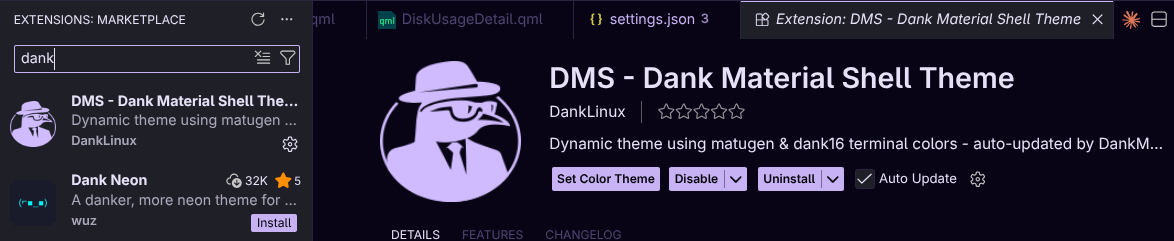
Install from the VS Code Marketplace by searching for "DMS - Dank Material Shell Theme":
Or install manually:
wget https://github.com/AvengeMedia/DankMaterialShell/raw/refs/heads/master/quickshell/matugen/dms-theme.vsix
code --install-extension dms-theme.vsix
# or: codium / cursor / windsurf --install-extension ...
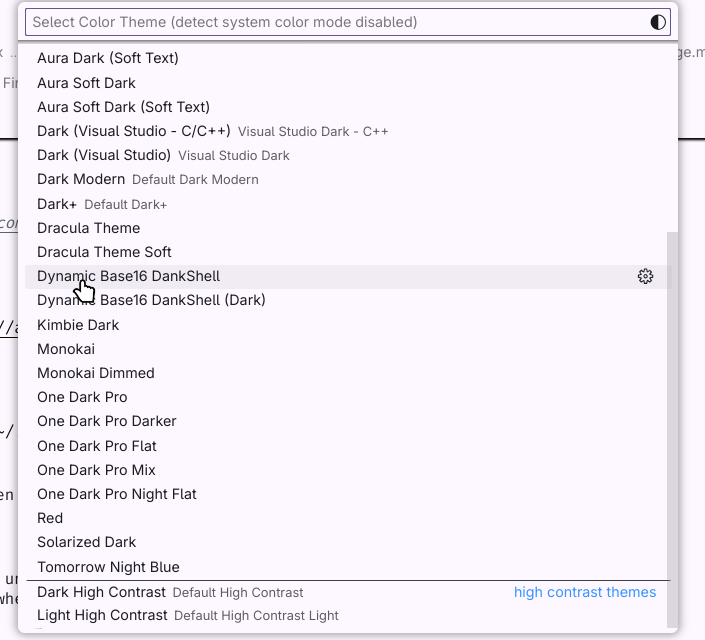
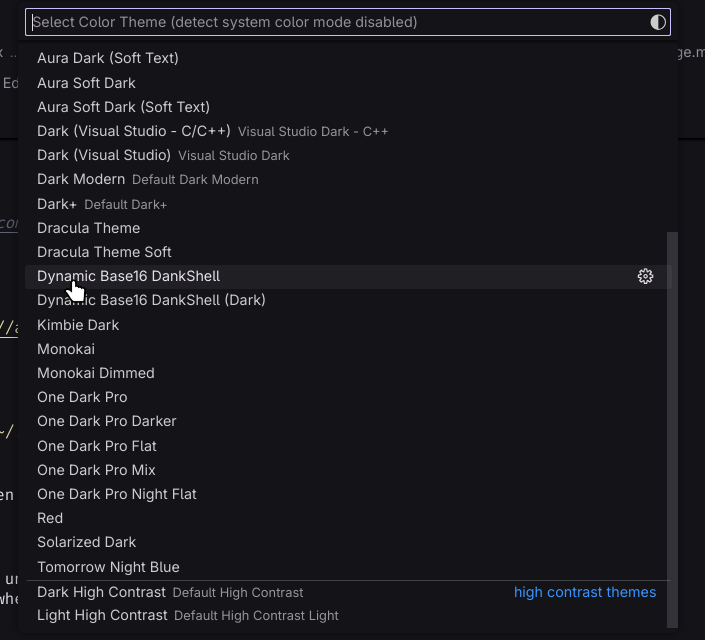
Activate: Open command palette (Ctrl+Shift+P), select Preferences: Color Theme, choose Dynamic Base16 DankShell (or DMS - Dank Material Shell in 1.2).
Trigger colors: Restart DMS or change wallpaper/theme to generate dynamic colors.
Terminal editors use a custom dank16 algorithm alongside matugen to generate a palette that honors the theme aesthetic while also providing 16 ansi colors.
echo "theme = dankcolors" >> ~/.config/ghostty/config
Optional - disable excessive notifications:
echo "app-notifications = no-clipboard-copy,no-config-reload" >> ~/.config/ghostty/config
echo "include dank-tabs.conf" >> ~/.config/kitty/kitty.conf
echo "include dank-theme.conf" >> ~/.config/kitty/kitty.conf
If you have customized the kitty theme, kitty may save dark-theme.auto.conf, light-theme.auto.conf, no-preference-theme.auto.conf in the configuration directory (usually ~/.config/kitty). Please delete them to make the theme take effect.
foot requires absolute paths in its configuration, edit ~/.config/foot/foot.ini to add the include:
[main]
include=/home/<USERNAME>/.config/foot/dank-colors.ini
Add the alacritty theme to your imports secton in ~/.config/alacritty/alacritty.toml
[general]
import = [
    "~/.config/alacritty/dank-theme.toml"
]
Reload or restart the terminal to apply colors.
GTK apps not themed:
adw-gtk-theme is installedls -la ~/.config/gtk-3.0/gtk.cssQt apps not themed:
qt6ct is installed if using Option 2Firefox theme not working:
about:config settings are correctTerminal colors not updating:
~/.config/DankMaterialShell/